RADIO AUTOMATION IN THE CLOUD
Radio automationin the cloud.
Music, broadcast clocks, scheduling and playout in one system. Control your broadcast through your own connected GPT with typed or spoken instructions.
Full manual controls remain available.
NexRadioFORMAT / 60 MIN
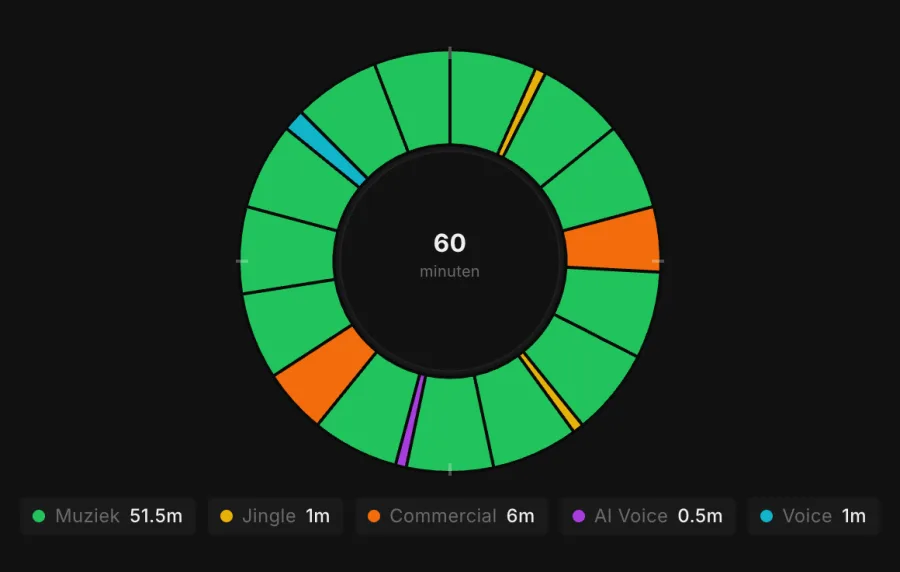
An hour built around your format.THE FOUNDATION OF YOUR BROADCAST
60′THE AUTOMATION SYSTEM
From your format to a complete broadcast.
Build a distinctive program with attention to every element.
01
Program with broadcast clocks
Define the structure of each hour. Give music, jingles and presentation their place within your format.
02
Scheduling and playout
Turn your format into a playlist and work with precise start, end and transition points for your broadcast.
03
Presentation that fits
Add announcements and other voice segments to your program. Listen to examples below.
YOUR OWN GPT AS THE CONTROLLER
Say what you want. NexRadio handles the execution.
Connect your own GPT to NexRadio. Describe how you want to structure an hour or which schedule you need. Your GPT passes the instruction to NexRadio, which executes it. Use your chatbot’s voice feature to speak the same instructions.
GPT → NEXRADIO
“Create the next hour’s schedule using my morning format.”
“Set up the next hour with more relaxed music and less presentation.”
Example instructions for your connected GPT. The connection is configured for your station.
Prefer to click? Broadcast clocks, schedules and settings remain available in the manual interface. Choose how you work for each task.
NEXRADIO IN PRACTICE
A few examples in action.
Here are a few examples of radio channels that use NexRadio. Click an app image to listen to the station here.
NexRadio
Open app ↗Viva Libido Radio
Open app ↗Ibiza Workout Radio
Open app ↗Sam
Open app ↗Sub Sub Ibiza
Open app ↗Choose a station to listen.
The app images are snapshots. You hear the current broadcast. Websites and listening apps are additional services for the radio automation system.
A few voices between the songs.
Five short announcements and two AI phone conversations from NexRadio.
Phone conversations
Announcements
Recorded AI examples in English. The phone conversations are generated, not real incoming calls.
Good to know.
Can I use my own music?
Your own library is the starting point. During the demo, we discuss your file formats, metadata and how to set up your music collection.
Can I switch with my existing format?
We review your library, hour clocks and current workflow. Then we agree on the setup, trial and switch.
Are music licences included?
Do not assume that a software subscription also covers music rights. The permissions you need depend on how you use the service and the countries where you broadcast.
What do I need to connect my GPT?
During setup, we configure the connection and permitted actions for your station.
How much does NexRadio cost?
You receive a proposal based on your station, storage, streaming capacity, AI usage and the guidance you need. No payments are taken automatically.
Explore your radio automation.
Discover what NexRadio can do for your station in a personal demo.
Book a demo
A personal demo. No payment details required.